
The WhatsApp 24-hour customer service window
What the 24-hour window is, exactly when it opens and closes, what you can send inside it, and how to reach a customer once it has expired.
On this page
WhatsApp does not let a business message whoever it likes, whenever it likes. Almost everything a business sends has to happen inside a 24-hour customer service window that the customer opens. Understanding this one rule explains most of what feels strange about WhatsApp as a support channel — why a reply that worked this morning is refused this afternoon, and why templates exist at all.
What opens the window
The window opens when a customer sends your business a message, and it stays open for 24 hours from that message, not from your reply. Every new inbound message restarts the clock at 24 hours from itself.
Nothing you do opens it. You cannot open a window by sending a template, by calling, or by having spoken to that person last week. Only an inbound message counts.
What you can send inside it
While the window is open you can send free-form messages: text you typed, a photo, a document, a voice note, an interactive list. This is ordinary conversation, and there is no per-message approval of any kind.
What happens when it closes
Once 24 hours have passed with no new inbound message, free-form messages are refused by WhatsApp. The only thing that still goes through is a message template that Meta has already approved — see Message templates. A template delivered to a closed conversation does not reopen the window either; it invites the customer to reply, and their reply is what opens it.
This is the part that catches teams out. The refusal happens at send time, not at compose time, so the natural failure looks like this: an agent writes three careful paragraphs to a customer who has gone quiet since yesterday, presses Send, and gets an error.
How Juno handles it
Juno treats the window as a writing-time concern, not only a delivery-time one.
- Every conversation carries its window state, so the composer knows before you start typing.
- When the window is closing — the last few hours — the inbox shows a countdown, so an agent can decide whether to finish the thread now.
- When it is closed, the composer locks and offers your approved templates in its place instead of accepting text that cannot be delivered.
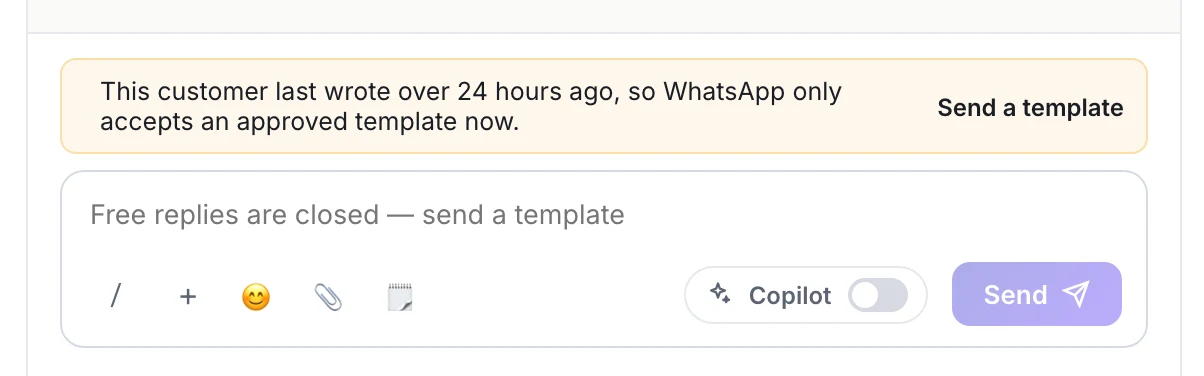
- Delivery enforces the rule independently as well. Even if something reached the send path with a stale window state, WhatsApp's rule is applied again rather than trusted from the UI.
The window is a WhatsApp rule, not a Juno one. Nothing in any platform can extend it, and a vendor that says otherwise is describing a template.
Practical consequences
Answer fast, and the window is rarely a problem. The clock is wall-clock, not working hours — a message that arrives at 5pm on Friday expires at 5pm on Saturday, whether or not anyone is in. A team that answers the same day essentially never meets it; a team that answers on Monday meets it every weekend.
Design your outbound around templates. Anything you initiate — an appointment reminder, an order update, a payment link — starts outside a window by definition, so it needs an approved template. Get those approved before you need them; approval takes Meta hours to days.
Do not batch overnight replies. A queue worked through the next morning is a queue of expired windows.
Watch the window, not the conversation age. A thread can be three months old and have an open window because the customer wrote ten minutes ago; a thread opened yesterday can be closed.